
Configure AMM
Quick Start
Open the management page, navigate to Amm -> Programs, click on amm-01, scroll to the bottom of the popup on the right, and click Save. 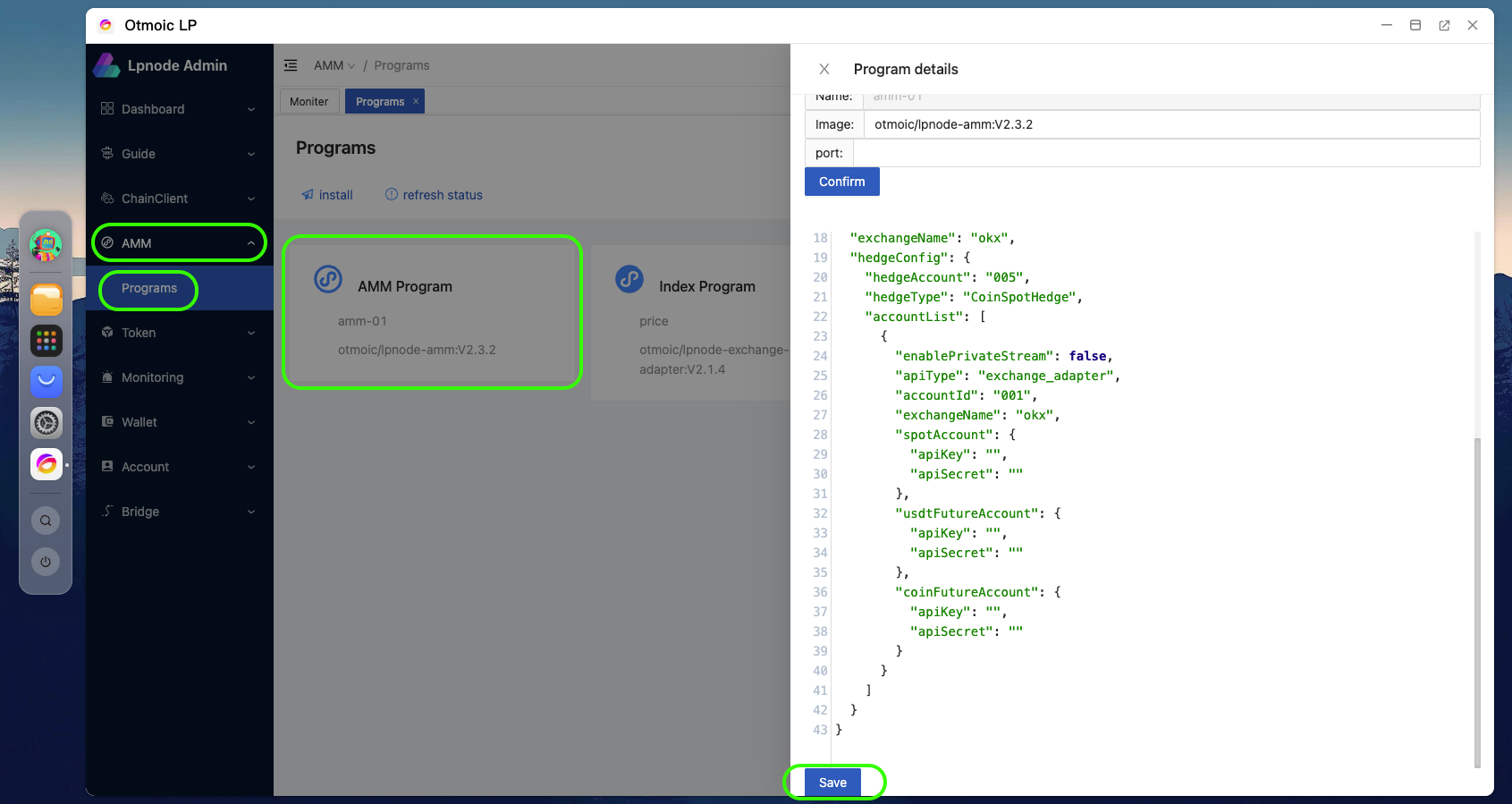
Tips
By following the tutorial above, you will start with our preloaded AMM configuration. If you wish to make some custom configurations, you can refer to the content later in this document.
Detailed Configuration
Both AMM and exchange_adapter uses this configuration file to ensure consistency in account and exchange information during loading.
json
{
  // Configure parameters for multiple blockchains, each blockchain has a unique chainId
  "chainDataConfig": [
    {
      "chainId": 9006, // Blockchain ID

      "config": {
        "maxSwapNativeTokenValue": "50000", // Maximum exchange native token value. The maximum value in the quote is the minimum of the following: 1. The balance of the target chain's native tokens 2. The maximum executable amount in hedging strategy  3. The balance of the CEX during hedge operation 4. The configured value here.
        "minSwapNativeTokenValue": "0.5" // An outdated value, currently not in use
      }
    }
  ],
  // Basic configuration of bridge
  "bridgeBaseConfig": {
    "defaultFee": "0.003", // How much cross-chain fee is charged
    "enabledHedge": false, //  Whether to enable hedge
    "minChargeUsdt": "" //When users perform token swaps with small amounts, the standard 0.3% fee might not cover the actual transaction costs. You can set a minimum fee requirement here, and the AMM (Automated Market Maker) will factor this minimum fee into its price quotations.
  },
  // This configures specific cross-chain bridges (e.g., ETH-USDT). It has higher priority than bridgeBaseConfig, and it will override the configuration of the corresponding pair. If you want to use the hedging function for some certain token exclusively, or set a separate fee, you can use this option.
  "bridgeConfig": [
    {
      "bridgeId": "64452225c1bb584223010906",
      "fee": "0.01",
      "enableHedge": false
    }
  ],
  // Order book type, here is market order book
  "orderBookType": "market", // When the value is market, the orderbook is initialized as the Cex type and is obtained from the exchange_adapter. Currently, only `market` is supported. If you want to use other orderbooks, please configure a values and write the corresponding implementers.
  "exchangeName": "okx", // This parameter is used to control from which centralized exchange to fetch market data. Please refer to the exchangeName in ccxt for the name
  // Hedge configuration
  "hedgeConfig": {
    "hedgeAccount": "001", //hedge account ID. When you set 'enabledHedge' to true, the system pulls up account information that matches the 'accountList' set below, using this value. currently, the AMM app only supports accounts related to spot. "hedgeType": "CoinSpotHedge", // Hedge type

    "accountList": [
      // Account list
      {
        "enablePrivateStream": false, // Whether to enable the private stream
        "apiType": "exchange_adapter", // API type: exchange adapter, exchange|profolio|exchange_adapter corresponds to local exchange implementation|use profolio|use exchange_adapter, it is used to configure how the system initializes the exchange, load the transaction information, sync account information, and operate orders
        "accountId": "001", // Account ID, when id == hedgeConfig.hedgeAccount is configured, this account will be enabled.
        "exchangeName": "okx", // The name of the exchange corresponds to the account. This takes effect when the API type is either `portfolio` or `exchange_adapter`.
        "spotAccount": {
          // Spot account information
          "apiKey": "", // API key
          "apiSecret": "" // API secret
        },
        "usdtFutureAccount": {
          // USDT denominated futures account information
          "apiKey": "", // API key
          "apiSecret": "" // API secret
        },
        "coinFutureAccount": {
          // Coin denominated futures account information
          "apiKey": "", // API key
          "apiSecret": "" // API secret
        }
      }
    ]
  }
}